AI rebar takeoffs, built by a rebar estimator

Every number carries its source.

An AI estimating assistant built by a rebar estimator with 25+ years on the job. It reads the drawings, does the counting and cites the sheet behind every bar, so you can check its work in seconds.

Rules enforced in code Your drawings stay private You stay the estimator
ART · Sample job output
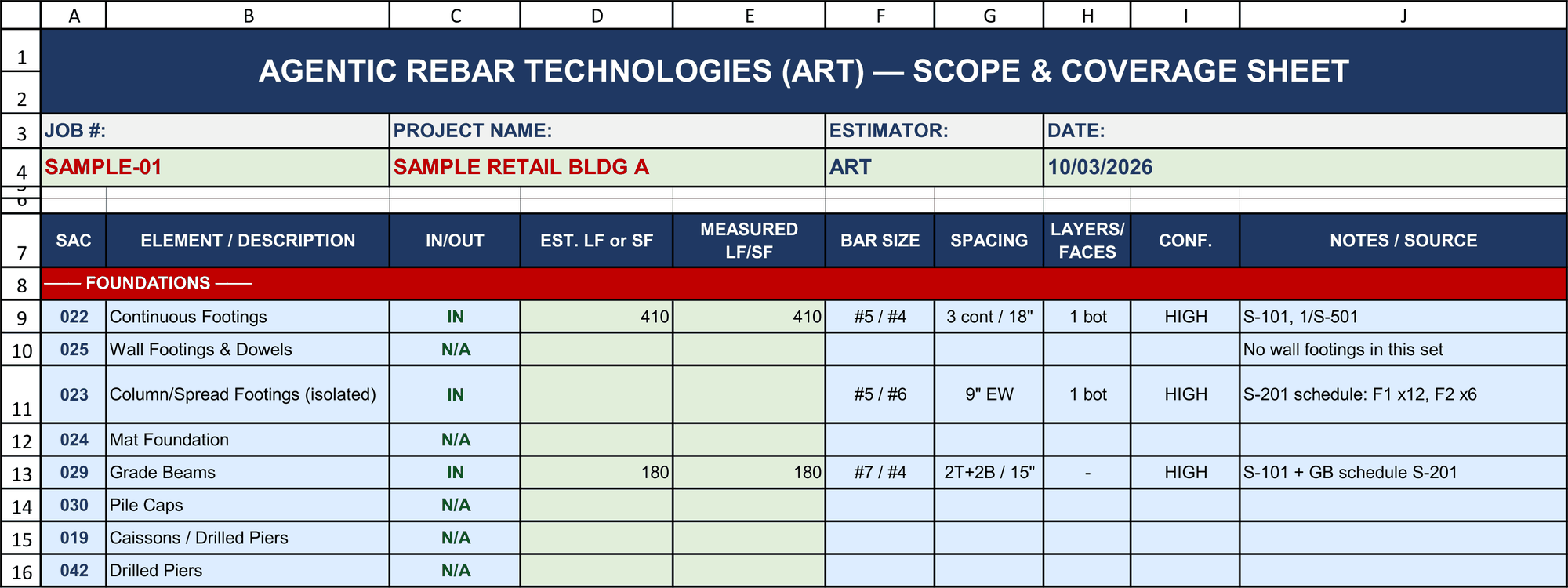
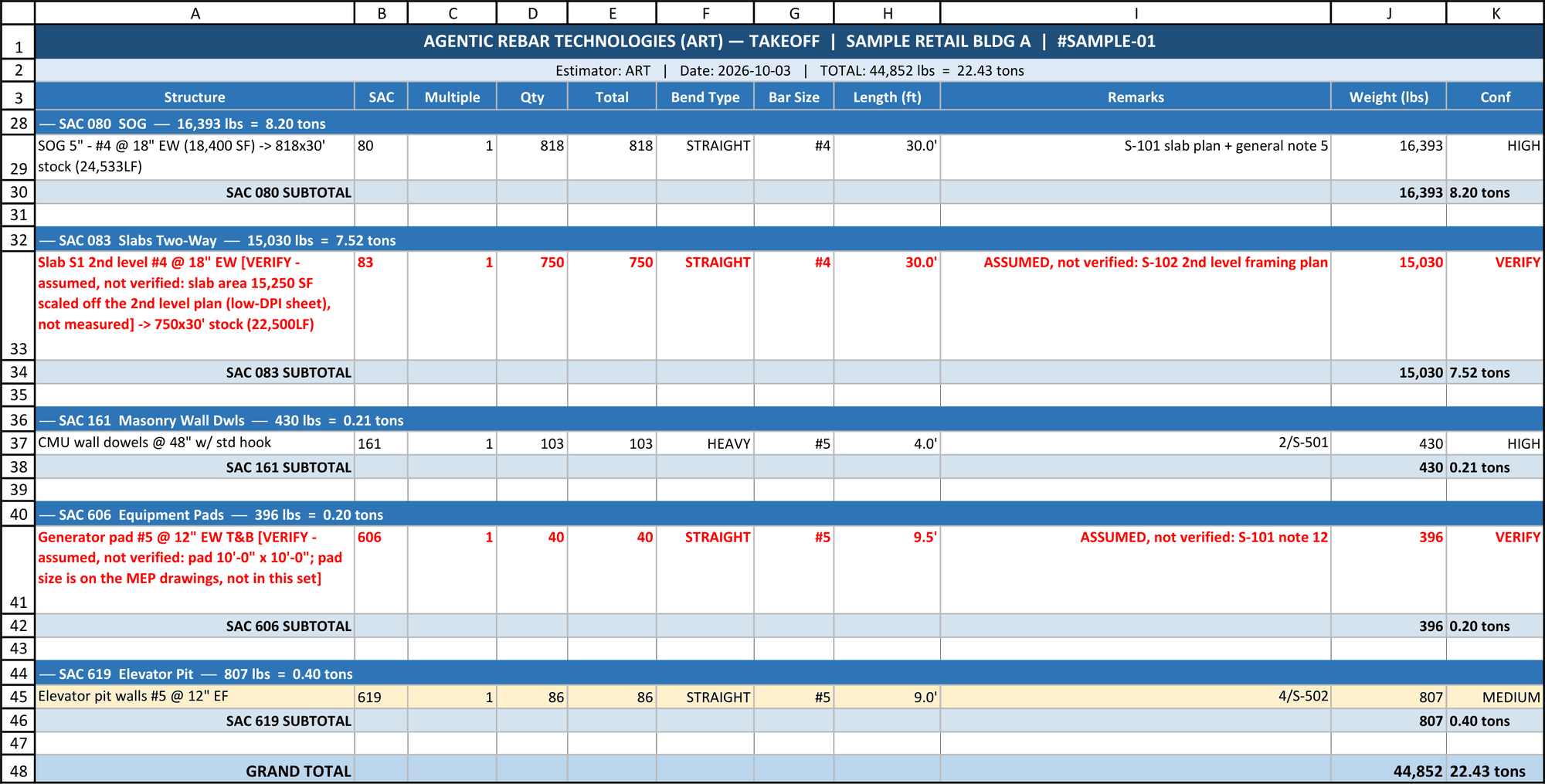
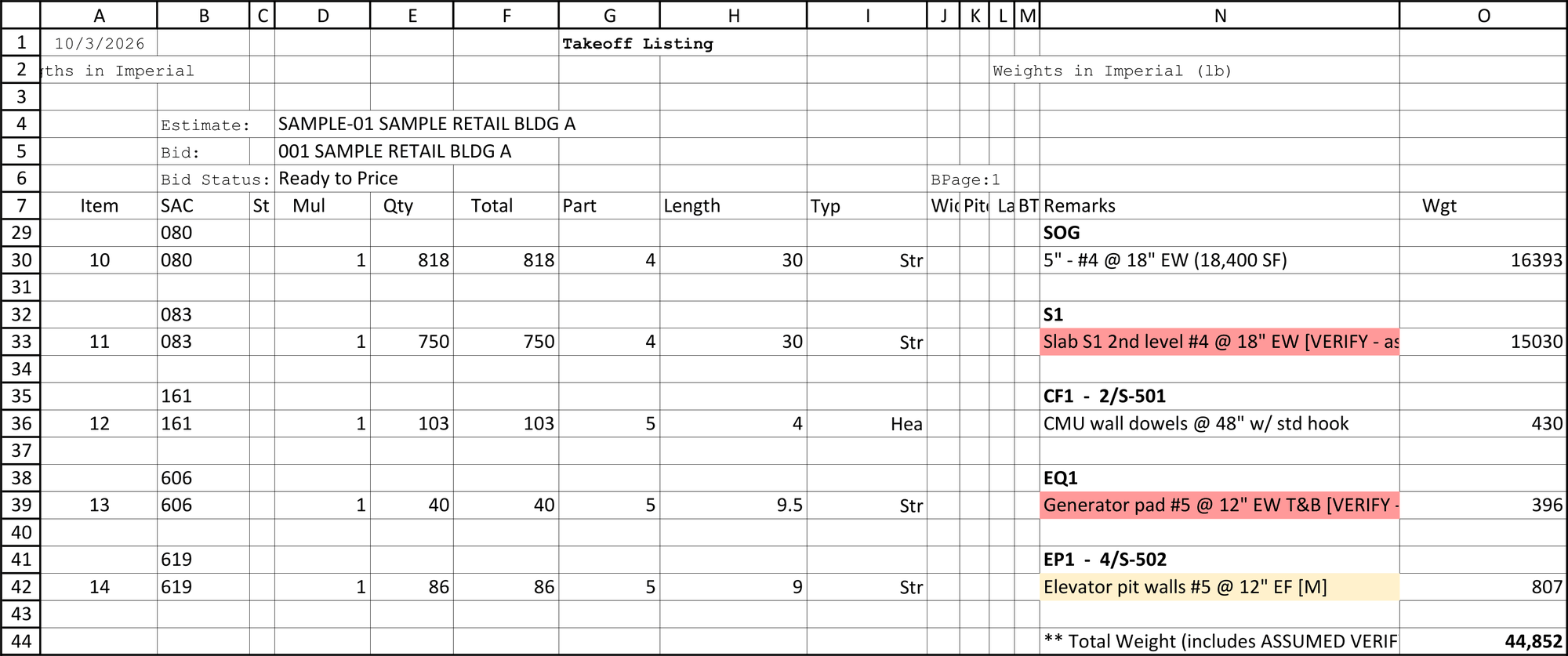
Scope and Coverage sheet for the sample job: job number, project, estimator and date, then each foundation element marked IN or N/A with bar size, spacing and source sheet ART takeoff workbook for the sample job: each line with its source sheet, two VERIFY lines in red with their assumptions, grand total 44,852 lb Soule import for the sample job, grouped by structure, VERIFY lines highlighted red, total weight 44,852 lb
HIGH cited to its sheet · VERIFY assumed weight, red until checkedClick to enlarge

Real ART output, printed from Excel, on a made-up sample job.

The overview

See it work, start to finish.

Drawings in, sourced takeoff out, with every check shown.

Narrated overview, coming soon

A two-minute walkthrough of the presentation with voice-over and music.

Results from live bids

Two jobs, timed and checked.

Both checked against a real answer: the weight that actually shipped.

Large parking structure

Side by side with a hand takeoff

8+ hrs
The founder using OST + Soule
→
37 min
ART's take-off ready for human review
Within 0.02% of the shipped vs estimated weightThe job has shipped. About 3 hours start to finish, including the founder's review.
Podium building, already shipped

Checked against the real shipped weight

~22 hrs
The customer's estimator
→
<2 hrs
ART's first number
Within 1.7% of the shipped weightThe final number, after the founder's review.

Source: the founder's records of two live bids. Results depend on plan quality and scope; estimator review is always required.

How it works

It reads like an estimator, calculates like a machine and cites like an auditor.

1

Upload the drawings

Drop in the structural PDFs and your scope sheet, and tell it what to take off.

2

Watch it work

It reads the schedules, sections and details and adds lines one at a time. You see its reasoning live and can challenge any number.

3

Review and download

Fill in the VERIFY items only you can measure, clear the checks, and download a sourced takeoff workbook.

Guardrails

Enforced by the engine, not by memory.

These aren't reminders the AI is supposed to remember. A line without a source can't get into the takeoff as a real number.

No source, no number

A line that doesn't cite its sheet or detail is refused, or goes on your VERIFY list with its assumed weight. Never a zero.

Every structure accounted for

Checked against the drawing index. No bid item sits silently at zero.

Every detail cut swept

Every detail cut is cross-referenced, and each one has to be cleared.

One bar type per line

Verticals, horizontals, dowels and ties are never blended into one number.

Bend types by rule

Straight, heavy (1 to 2 bends), light (3 or more). A single hook is heavy, every time.

F.F. means Finish Floor

Already knows all symbols and abbreviations, so EF counts both faces, every time.

The estimator challenged a splice length. The assistant pointed to the general note that referenced it. The note won.
A real moment from a live bid

Disagreements get settled by the drawings, not by who sounds more sure. That's what a source on every line buys you.

And when the source shows the assistant got it wrong, you see that just as fast, and you correct it on the spot. Every change is logged in the workbook.

Lessons built in

Every rule traces to a real miss.

The missWhat the system does now
Connection dowels called out only on a detail sheetDetail sweep: every detail bubble on the plans is listed and has to be cleared
Bond-beam bars counted as masonry wall dowelsEvery bar role gets its own line and its own code
One flat splice factor across a large slabLaps computed per stock bar, from the actual bar lengths
Top and bottom splice lengths treated alikeApplied per the general notes, with the note cited on the line
A rounding error inside its own codeFound and fixed; a regression test suite re-checks every change
Straight talk

What it is, and what it isn't.

It is

  • A force multiplier for a working estimator
  • A second set of eyes that never skips a detail sheet
  • Transparent, with a source on every line
  • Consistent: the same rules on every job

It isn't

  • A replacement for the estimator
  • A one-click, hands-off takeoff
  • A measuring tool: you measure in the software you already use
  • Magic on bad scans: clean PDFs work best
Who it's for

Built for the people who do the takeoffs.

Fabricator estimating teams

More bids per estimator, fewer misses, and takeoffs a reviewer can check line by line.

Independent rebar estimators

Take on more work without cutting corners on the details.

Concrete subcontractors

Rebar takeoffs done in-house, with the sources to back them up.

Pricing

One seat per desktop. Billed monthly.

The engine runs on our server, so there's nothing to maintain, and every improvement reaches every seat.

Solo

For the independent estimator.

$295 / month
  • 5 takeoffs included each month
  • Extra takeoffs $60 each
  • Live reasoning and sourced workbook
  • Private workspace for your drawings
Book a demo
Founding five

Founding customer

For the first five customers. Price locked for 6 months.

$195 / month
  • 3 takeoffs included each month
  • Extra takeoffs $60 each
  • Price locked for 6 months
  • Direct line to the founder
Claim a founding seat

Fabricator seat

For estimating teams. About two takeoffs a week per seat.

$500 / month
  • 8 takeoffs included per seat
  • Extra takeoffs $60 each
  • Add seats as your team grows
  • Set up to your shop's rules
Book a demo

$3,000 setup, including a 1-week pilot that sets up your cost codes and shop rules. AI provider: Anthropic's Claude API, under its commercial terms.

Next step

See it on a sample job.

A live walkthrough from start to finish: drawings in, sourced takeoff out, with every check shown.

thad@agenticrebar.com

Tell us your company, a phone number and a few good times. We'll set up the walkthrough.